How to Change or Set Your Instagram Username in 2026 (Full Guide)
By FreeTricksWorld | Updated: March 29, 2026
Whether you are rebranding your business, creating a fresh aesthetic for your personal grid, or simply tired of the handle you picked back in 2018, changing your Instagram username is a quick and painless process.
However, many users get confused between their Username (the @handle people use to tag and search for you) and their Display Name (the bold title at the top of your bio).
In this quick, step-by-step guide, we will show you exactly how to change both on mobile and desktop devices without losing your followers or verification badges.
Quick Steps: How to Change Your Instagram Username on Mobile
Since over 90% of users access the app on their phones, here are the official steps to update your handle on the iOS or Android mobile app:
- Open the Instagram app and tap on your profile icon in the bottom right corner.
- Tap the large Edit Profile button located right below your bio.
- Tap on the Username field.
- Delete your old handle and type in your new desired username.
- If the name is available, a green checkmark will appear. Tap the Done button (or checkmark icon) in the top right corner to save your changes.
💡 Pro-Tip: If the username you want is unavailable, do not settle for adding random strings of numbers like
alex_1994857. Instead, try using clean modifiers like adding a period (e.g.,@alex.studio) or adding small words at the front (e.g.,@its.alex).Using this ways you can easily change your latest instagram username for boys and new instagram usernames for girls .
How to Change Your Instagram Username on Desktop (Web Browser)
If you prefer managing your account or business page from a laptop or desktop computer, follow these instructions:
- Go to Instagram.com in your web browser and log into your account.
- Click on your Profile Picture in the left-hand navigation menu (or top right corner depending on the UI layout).
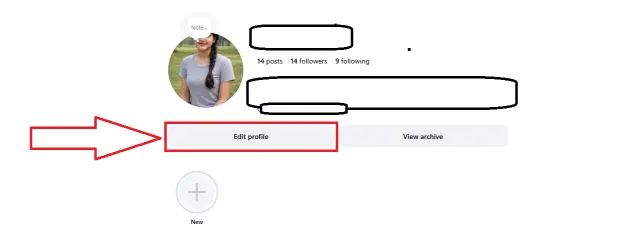
- Click the Edit Profile button next to your username.
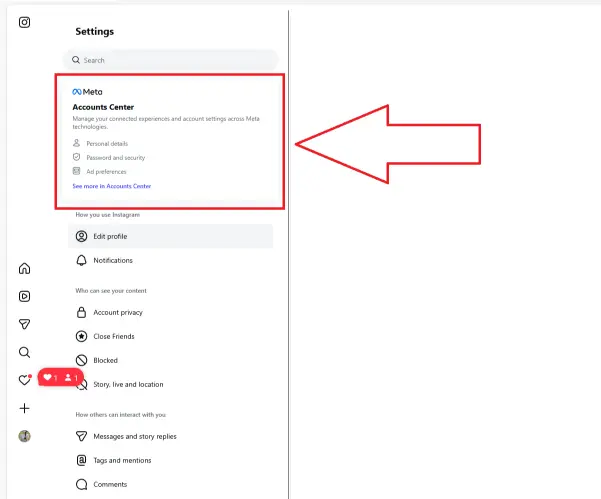
- Next click on the Account center meta box located left side of the screen.
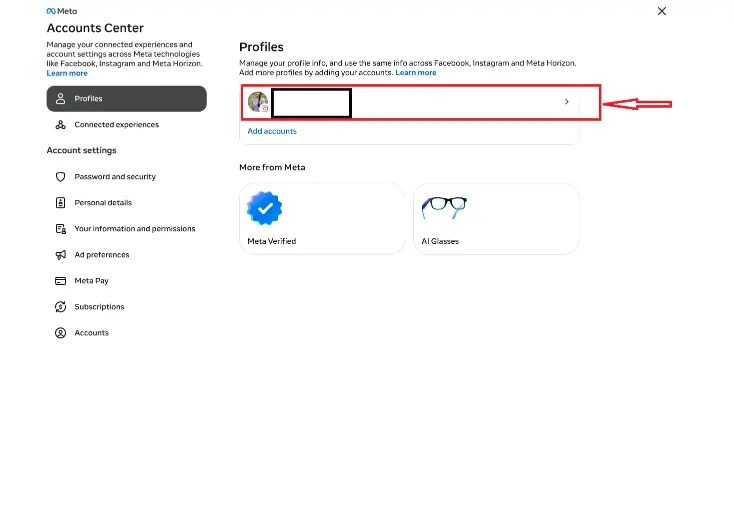
- Next click on your profile name link.
- One popup will appear then click on the username field.
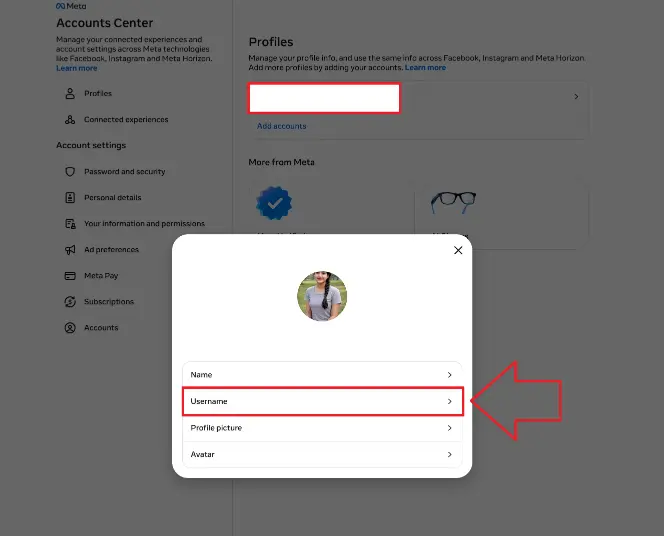
- Then click copy paste the username from here to your instagram
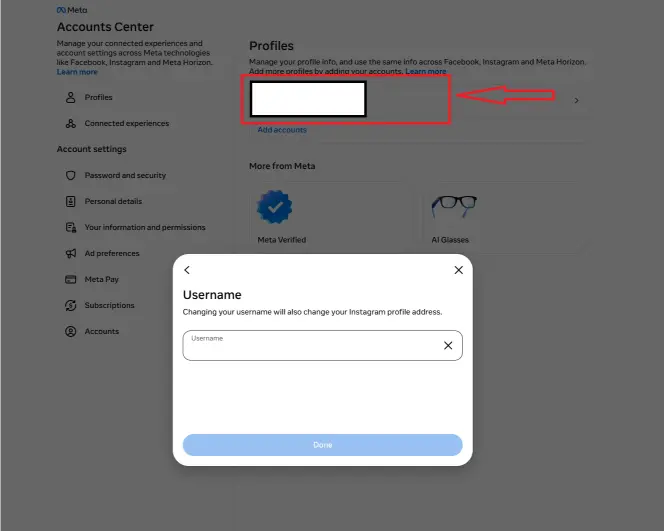
Next click on done button to save it.
Username vs. Name: What is the Difference?
When editing your profile, you will see two distinct fields at the top. It is vital to understand the difference so your profile looks clean and searchable:
| Feature | The Username (@handle) | The Display Name |
| What it is | Your unique identity address on the platform. | Your real name, business name, or brand title. |
| Character Limit | Up to 30 characters (No spaces or special symbols allowed except periods and underscores). | Up to 30 characters (Can include emojis, spaces, and capital letters). |
| Uniqueness | Must be 100% unique. No two people can have the same username. | Does not have to be unique. Multiple accounts can be named “John Doe.” |
| Searchability | This is what people type after the @ symbol to tag you in posts and comments. | Helps people find you if they only know your real-world name. |
3 Important Things to Know Before You Change Your Handle
Before you hit that submit button, keep these three critical platform rules in mind:
- The 14-Day Grace Period: If you change your mind and want your old username back, Instagram will “lock” your old handle for 14 days so nobody else can steal it. After 14 days, it becomes open to the public.
- Links Will Break: Your old Instagram URL (e.g.,
instagram.com/youroldsite) will instantly stop working and display a “Page Not Found” error. Make sure to update the links on your website, email signatures, and other social media channels immediately! - Verification Badges: If your account has a Meta Verified blue checkmark, changing your username may cause you to temporarily lose your verification status while Instagram reviews the change to ensure you aren’t impersonating someone else.
Frequently Asked Questions (FAQ)
Why does it say my Instagram username is not available?
This means another user on the platform has already claimed that exact handle. You will need to add a modifier (like an underscore or period) or choose a completely different name.
Can I change my Instagram username back to the old one?
Yes, as long as nobody else has claimed your old handle after the 14-day lock period expires.
How many times can I change my username?
There is no set limit on how many times you can change your handle, but Instagram’s spam filters may temporarily block you from making changes if you try to change it multiple times in a single hour.

admin



![Easy Tricks How To Unlock Locked Content in 2022[New]](https://www.freetricksworld.com/wp-content/uploads/2022/03/image-3.png)