Tower FL Codes (October 2026): Free Coins, Premium Boxes & Titles
Last updated: October 20, 2026
Looking for the latest Tower FL codes? Use these Roblox codes to claim free Coins, Premium Boxes and exclusive titles while competing to reach the top of randomly generated obstacle towers.
All Active Tower FL Codes
| Code | Rewards | Status |
|---|---|---|
box is back! | 1,000 Coins | Active |
code is back! | 1,000 Coins | Active |
noob | Noob Title and bonus Coins | Active |
Free Premium Box | 4 Premium Boxes | Active |
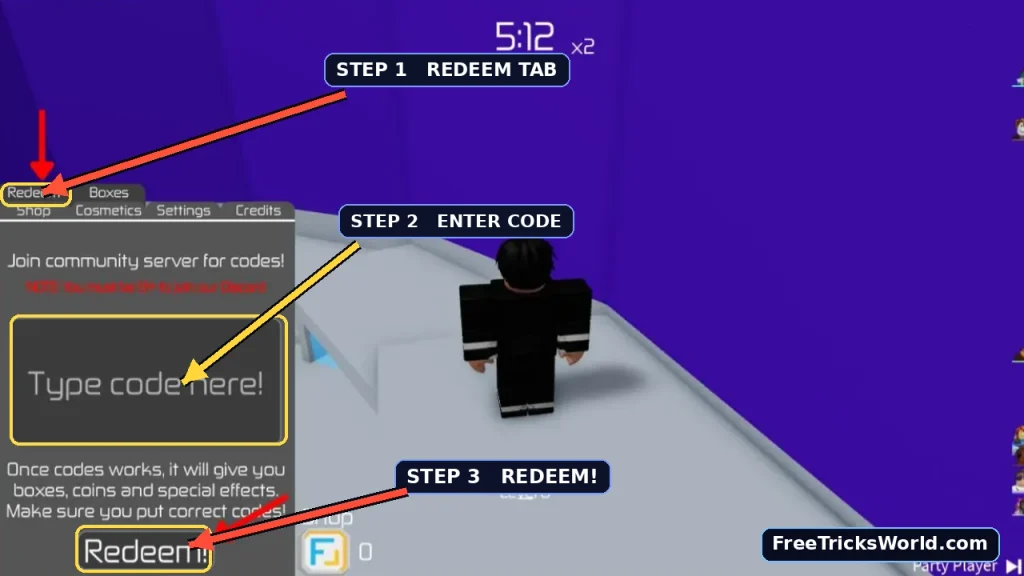
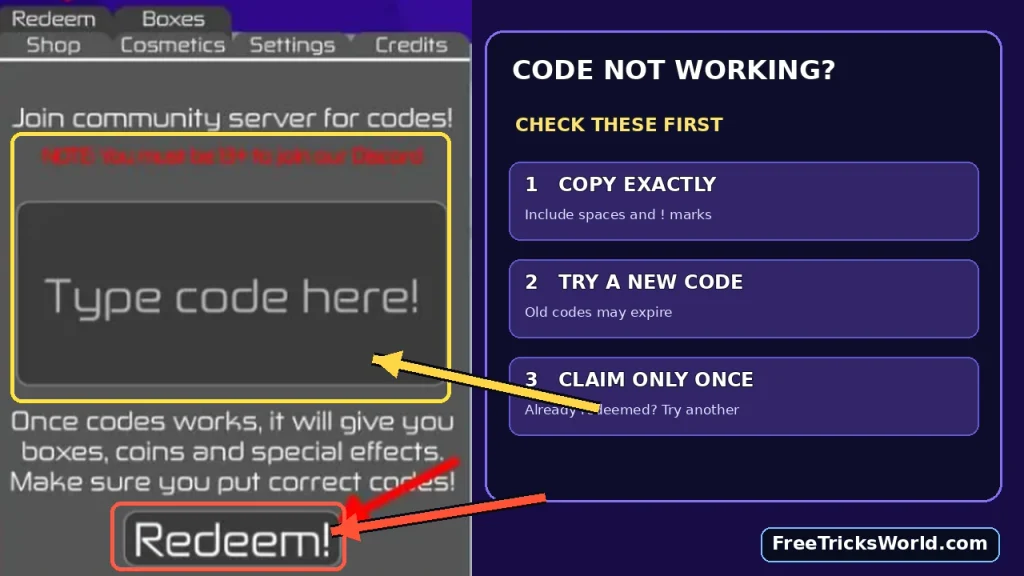
Quick Answer: The Tower FL codes to try are box is back!, code is back!, noob and Free Premium Box. To redeem them, launch Tower FL, open the Shop (F icon), select the Redeem tab, enter your code and press Redeem!
The two 1,000-Coin promotions offer a combined 2,000 Coins when both are accepted. The noob promotion also includes Coins, although published reward quantities differ.
Important: Copy the codes exactly, including the spaces and exclamation marks in the two is back! codes. Promotional codes can be disabled by the developer, so check the redemption result before assuming a reward has been claimed.
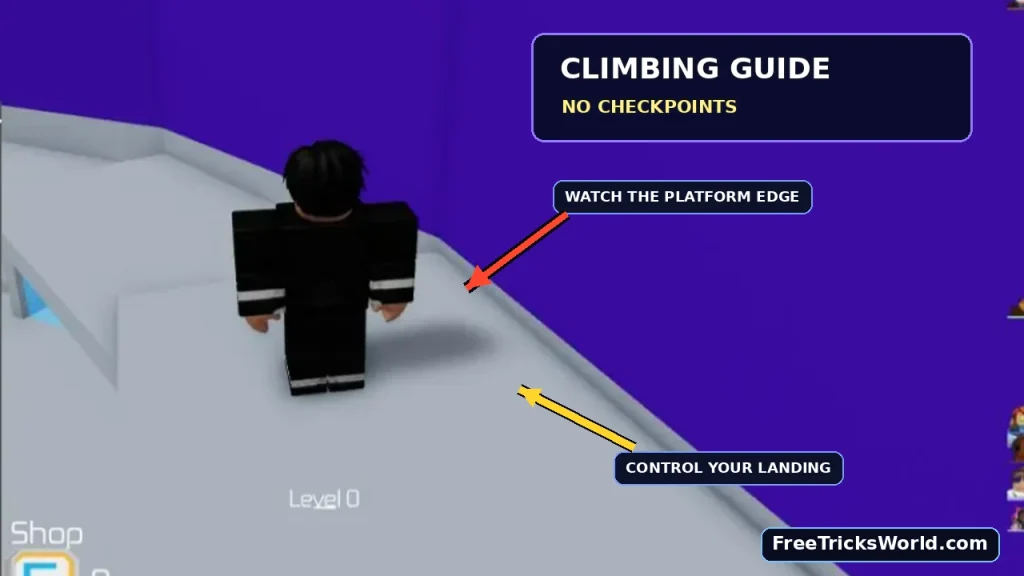
Tower FL is a Roblox obby game developed by Fathul. The game features randomly generated climbing stages, challenging jumps and competitive races against other players. Unlike obstacle games with save points, Tower FL has no checkpoints. A single mistake can send you back to the bottom.
The game rewards successful stage progression with Coins that can be spent on cosmetic boxes and other eligible Shop items.
Expired Tower FL Codes
These older promotional codes belong to previous events and reward releases.
| Code | Previous Rewards | Status |
|---|---|---|
Box is Back | Earlier Coin promotion | Expired |
Code is Back | Earlier Coin promotion | Expired |
RAMADHAN2025 | Special event rewards | Expired |
VALENTINE2025 | Valentine’s event rewards | Expired |
HAPPYNEWYEAR | New Year promotional rewards | Expired |
Note: The older Box is Back and Code is Back spellings should not be confused with the newer versions containing lowercase letters and an exclamation mark.
If an expired code is rejected, there is no normal way to restore it. You’ll need to wait for another developer promotion.
How to Redeem Tower FL Codes in Roblox
Tower FL codes are redeemed through the in-game Shop, not a Twitter icon or Roblox’s general gift-card redemption page.
Follow these steps.
Step 1: Launch Tower FL
Open the official Tower FL game on Roblox.
Confirm that the creator is Fathul.
Wait until your character loads into the game.
Step 2: Open the Shop
Look for the Shop button with the F icon near the bottom-left section of your screen.
Select it to open the Shop.
Step 3: Select the Redeem Tab
Inside the Shop interface, find the Redeem tab near the upper-left area of the menu.
Click or tap the tab to open the code-entry screen.
Step 4: Enter a Tower FL Code
Find the text field labelled Type Code Here!
Copy an available code, such as:
Free Premium Box
Paste it into the field without adding extra characters.
Step 5: Press Redeem!
Select the Redeem! button to submit the code.
If it is accepted, your reward will be added to the appropriate account balance or inventory.
Step 6: Check Your Rewards
Open the relevant Shop, inventory or customization screen to confirm your reward.
- Coins should appear in your Coin balance.
- Premium Boxes should appear in the applicable box inventory.
- The Noob Title should be accessible through the supported title or customization menu.
Repeat the process for the remaining codes.
How to Redeem Tower FL Codes on Mobile
Mobile players can follow the same process:
- Open Tower FL in the Roblox app.
- Tap the Shop icon.
- Select Redeem.
- Paste the code into the text field.
- Tap Redeem!
If your keyboard hides the redemption button, close it after entering the code.
What Do Tower FL Codes Give You?
Tower FL codes mainly provide customization rewards and in-game currency.
Understanding these items will help you decide what to purchase with the Coins you receive.
Tower FL Rewards Explained
| Reward | What It Does | Recommended Use |
|---|---|---|
| Coins | Currency earned from stages and promotional codes | Buying boxes or other eligible Shop items |
| Premium Boxes | Randomized cosmetic rewards | Expanding your cosmetic collection |
| Noob Title | An unlockable title for your profile or character | Personalization |
| Regular Boxes | Random cosmetic items | Collecting different appearances |
| Mutators | Optional changes to round conditions | Experimenting with gameplay |
Free Coins
Coins are the main currency used for purchasing cosmetic boxes and eligible items.
You can earn Coins through successful climbing and certain promotional rewards.
For beginners, free Coins are useful because they let you explore the Shop without spending as much time collecting currency.
Premium Boxes
The Free Premium Box code provides four Premium Boxes.
Boxes give you randomized cosmetic rewards, making them useful for players who enjoy collecting appearances and customization items.
Important: Cosmetic boxes are not guaranteed to provide climbing-speed, jump-height or other gameplay advantages.
Noob Title
The noob code unlocks the Noob Title along with a Coin reward.
Titles let you personalize your identity in Tower FL.
If you enjoy collecting exclusive customization rewards, claim this promotion before it expires.
How to Get More Coins in Tower FL
Codes provide free Coins, but regular gameplay is the main way to build your balance.
Tower FL rewards players for successful stage progression.
1. Complete Stages Consistently
Instead of attempting every difficult jump at maximum speed, concentrate on successfully reaching the next platform.
A completed stage contributes to your progress and Coin earnings.
2. Improve Your Movement Accuracy
Most failed runs come from mistimed jumps, poor positioning or rushing near narrow platforms.
Practice judging jump distance and controlling your landing position.
Consistent movement can help you complete more stages over time.
3. Avoid Risky Shortcuts
Some obstacles offer paths that appear faster but require more precise movement.
If you frequently fall while using a shortcut, the safer route may actually help you earn Coins more efficiently.
4. Practice Different Stage Types
Tower FL randomly generates its tower stages.
Learning how to handle moving obstacles, thin platforms, rotating hazards and precision jumps gives you a better chance of completing unfamiliar sections.
5. Spend Your Coins Carefully
If your main goal is collecting cosmetics, compare the available box options before purchasing.
Opening boxes involves randomized outcomes, so you might receive an item you already own or one you don’t particularly want.
Coins vs Boxes vs Mutators
| Your Goal | What to Prioritize |
|---|---|
| Collect different appearances | Cosmetic Boxes |
| Unlock special cosmetic rewards | Premium Boxes |
| Experiment with gameplay conditions | Available Mutators |
| Build currency for later purchases | Save Coins |
| Improve your climbing performance | Practice movement and stage patterns |
Beginner recommendation: Use free Premium Boxes first and inspect the cosmetic items you’ve received. Then decide whether to spend Coins on additional boxes or save them for future Shop items.
Tower FL Beginner Guide: How to Reach the Top
Tower FL is built around quick obstacle-course rounds where players compete to finish a tower before the timer expires.
The stages change between rounds, so learning general movement mechanics matters more than memorizing one route.
How a Tower FL Round Works
| Feature | Gameplay Detail |
|---|---|
| Game type | Obby / platformer |
| Developer | Fathul |
| Tower generation | Randomly generated stages |
| Checkpoints | None |
| Main objective | Reach the top before the timer runs out |
| Main currency | Coins |
| Main collectible rewards | Cosmetics, boxes and titles |
| Multiplayer | Race against other players |
Tip 1: Learn the Camera Controls
Camera positioning affects your ability to judge platforms.
Before attempting a difficult jump, adjust your view so the next landing surface is easy to see.
Avoid changing the camera angle dramatically while airborne unless necessary.
Tip 2: Take Controlled Jumps
Rushing can cause you to overshoot narrow platforms.
Approach difficult sections carefully, align your character and jump when you’re confident about the landing.
Tip 3: Watch Moving Obstacles
Some sections include moving or rotating hazards.
Observe their pattern before jumping.
Waiting briefly for a safe opening can be faster than falling and restarting.
Tip 4: Avoid Following Players Too Closely
When multiple players attempt a small platform, their avatars can make it harder to see the obstacle clearly.
Maintain enough distance to judge your own movement and landing.
Tip 5: Focus on Difficult Stages
If you repeatedly fail the same obstacle type, spend time understanding its timing and required movement.
Improving one difficult skill can benefit you across many different randomly generated towers.
Tip 6: Manage the Round Timer
Tower FL challenges players to finish before the timer runs out.
Check the remaining time periodically, but don’t let the countdown cause unnecessary mistakes.
A steady pace is often more effective than reckless jumping.
Tip 7: Use Private Servers for Practice
If you own a private server, Tower FL provides commands that let you modify certain round conditions.
Shorter towers can be useful for practicing specific movement techniques or playing casual rounds with friends.
Tower FL Private Server Commands
One useful Tower FL feature is the ability for VIP server owners to customize their climbing experience.
The official Roblox game description includes several supported commands.
Private Server Command Table
| Command | Function |
|---|---|
/skip | Skip the current tower round |
/setlength 4 | Configure a four-stage tower |
/setlength 10 | Configure a ten-stage tower |
/setlength 50 | Configure a 50-stage tower |
/lock | Lock access to the Shop |
/unlock | Reopen Shop access |
The official description specifies 4–200 stages for the /setlength command.
How to Change Tower Length
If you’re the private server owner:
- Enter your Tower FL private server.
- Open the Roblox chat.
- Type
/setlength 10to configure a ten-stage tower. - Send the command.
- Follow the game’s instructions or wait for the applicable round to use the new length.
This is useful when you want to practice without attempting a full-length tower every time.
How to Skip a Round
Enter:
/skip
This skips the current tower and advances to another round.
How to Lock or Unlock the Shop
Use:
/lock
to lock the Shop, and:
/unlock
to reopen it.
These commands are designed for server owners and won’t necessarily work in ordinary public servers.
Best Private Server Setup for Beginners
A shorter tower can be useful when you’re learning basic movement and jumping techniques.
For more experienced players, a longer tower provides a greater endurance challenge.
Private-server configuration doesn’t guarantee additional rewards or faster progression. Choose settings based on how you want to practice.
Tower FL Codes Not Working? Common Fixes
If your code is rejected, check these possible causes.
| Problem | Solution |
|---|---|
| Code expired | Try another available code |
| Incorrect punctuation | Include the exclamation mark where required |
| Wrong capitalization | Copy the code exactly |
| Missing spaces | Preserve the spaces in multiword codes |
| Already redeemed | Use a code you haven’t claimed |
| Wrong menu | Open Shop → Redeem |
| Server or interface issue | Rejoin Tower FL and try again |
| Reward not visible | Check Coins, Boxes or Titles |
The Code Says Invalid
First confirm that the code has been copied correctly.
For example:
Correct: box is back!
Incorrect: box is back
The missing exclamation mark changes the entry.
Free Premium Box Is Not Working
Make sure you’re typing the complete phrase Free Premium Box, including spaces.
If the promotion has already been used on your account, the game may reject another attempt.
Noob Code Not Working
Enter:
noob
Check the game’s response and your available Titles.
If the code is no longer accepted, wait for another developer promotion.
I Cannot Find the Redeem Button
Open the Shop, then select its Redeem tab.
The code-entry box is part of the Shop interface rather than Roblox’s account settings.
Coins or Boxes Did Not Appear
Check which code you entered.
The noob code provides a Title and Coins, while Free Premium Box provides boxes instead of a direct Coin reward.
Look in the appropriate inventory or balance before trying again.
Where to Find More Tower FL Codes
New Tower FL codes may become available during developer updates, celebrations or community milestones.
Official Tower FL Roblox Game
Check the official game page for changes to gameplay, rewards and developer information.
Fathul Roblox Community
This is the developer community associated with Tower FL.
Tower FL Discord
The community may share update announcements, new features and promotional codes.
Use official or developer-linked announcements when checking new rewards.
More Roblox Codes and Free Rewards
If you enjoy games that challenge your movement and progression skills, explore our Roll Your Height Codes guide for another Roblox experience focused on height-based progression.
You can also read our Chop a Forest Codes article for free rewards in a Roblox progression simulator.
For another game involving quick decisions and competition, visit our Hide in Pixels Codes guide.
Each game uses its own promotional-code system. Tower FL codes cannot be redeemed in other Roblox experiences.
Frequently Asked Questions About Tower FL Codes
What are the latest Tower FL codes?
The codes worth trying are noob, Free Premium Box, box is back! and code is back!.
How do I redeem Tower FL codes?
Launch Tower FL, open the Shop using the F icon, select Redeem, paste your code and press Redeem!
What does the noob code give?
The noob code provides the Noob Title and bonus Coins. Check the redemption confirmation for the exact amount credited.
What does Free Premium Box give?
The Free Premium Box code provides four Premium Boxes, which can unlock cosmetic rewards.
Does Tower FL have checkpoints?
No. Tower FL has no checkpoints, so falling can send you back to the bottom of the tower.
How do I earn Coins faster in Tower FL?
Complete stages consistently, learn obstacle patterns, avoid unnecessary falls and improve your movement accuracy.
Can you change the tower length in Tower FL?
Yes. Private server owners can use /setlength with a supported number between 4 and 200 to change the length of upcoming towers.
Do Tower FL boxes provide speed or jump boosts?
The official game description identifies boxes as a source of cosmetic items. Don’t assume a cosmetic reward increases speed or jump height.
Are Tower FL codes case-sensitive?
Copy each code exactly as displayed, including its spaces, punctuation and capitalization.
When will new Tower FL codes be released?
There is no guaranteed code-release schedule. Follow Fathul’s community and the Tower FL Discord for announcements.

Debasish Samal